
The Apple Mac Studio has always been aimed at people who need serious desktop performance without the size and complexity of a traditional workstation. The latest generation takes that idea considerably further with Apple’s M5 Max and M5 Ultra chips, huge amounts of unified memory, faster graphics, Thunderbolt 5 connectivity and a much stronger focus on local AI.
Apple describes the new Mac Studio as its most powerful Mac yet. The top configuration can combine an up-to-36-core CPU, 80-core GPU and up to 512GB of unified memory, giving professionals enough hardware to tackle demanding video production, 3D rendering, software development, data science and large local AI models.
In India, the Mac Studio with M5 Max starts at ₹2,79,900, while the M5 Ultra version starts at ₹6,29,900. Apple says the new Mac Studio becomes available from September 22, 2026, with the 512GB unified-memory configuration arriving later in October.
But does the Mac Studio make sense for everyone? Absolutely not. This is a machine designed for people whose workloads can actually take advantage of its enormous processing and memory capabilities.
Let’s take a closer look.
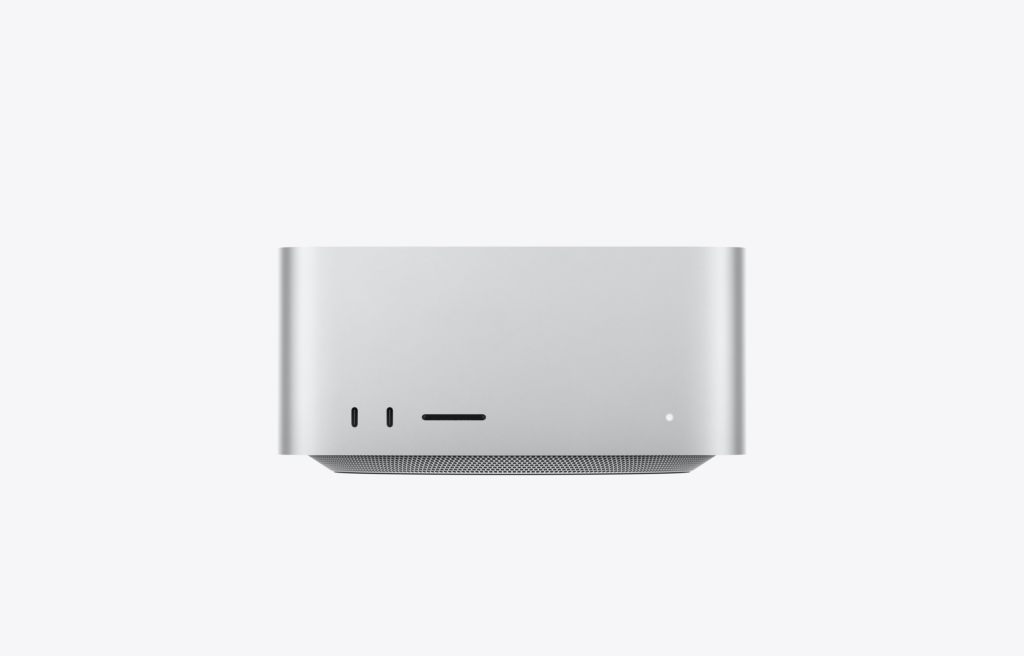
Apple Mac Studio: Highlights
- Starting price in India: ₹2,79,900
- M5 Max starting price: ₹2,79,900
- M5 Ultra starting price: ₹6,29,900
- Availability in India: September 22, 2026
- Processor options: M5 Max and M5 Ultra
- M5 Max CPU: 18-core
- M5 Max GPU: 32-core, configurable up to 40-core
- M5 Ultra CPU: 30-core, configurable up to 36-core
- M5 Ultra GPU: 64-core, configurable up to 80-core
- Maximum unified memory: 512GB
- Maximum storage: Up to 16TB
- Memory bandwidth: Up to 1.2TB/s
- Connectivity: Thunderbolt 5, HDMI, USB-A, 10Gb Ethernet
- Wireless: Wi-Fi 7 and Bluetooth 6
- Display support: Up to 8 external displays with M5 Ultra
- Operating system: macOS
- Apple Intelligence: Yes
Apple Mac Studio Price in India
The Apple Mac Studio price in India starts at ₹2,79,900 for M5 Max.
The much more powerful M5 Ultra Mac Studio starts at ₹6,29,900.
These are starting prices, and upgrading memory and storage can dramatically increase the final cost.
Apple Mac Studio Price Overview
| Model | Starting Price in India |
|---|---|
| Mac Studio M5 Max | ₹2,79,900 |
| Mac Studio M5 Ultra | ₹6,29,900 |
| M5 Max higher memory/storage | Higher |
| M5 Ultra higher memory/storage | Higher |
For comparison, the M5 Max model is already positioned as a professional workstation, while M5 Ultra is intended for exceptionally demanding production and AI workloads.
Compact Desktop Design
One of the most impressive things about Mac Studio is how much performance Apple manages to put into a relatively compact desktop enclosure.
The machine is designed to sit directly on a desk rather than occupy the space of a traditional tower workstation.
Its compact form factor makes it suitable for:
- Professional editing studios
- Music production desks
- Photography workstations
- Software development setups
- AI research labs
- 3D design studios
- Home offices
- Multi-monitor workstations
The understated silver enclosure also looks more like a premium desktop accessory than a conventional workstation.
Apple M5 Max Performance
The M5 Max is the more accessible of the two Mac Studio chip options.
It features an 18-core CPU, a 32-core GPU in the base configuration and a 16-core Neural Engine. Apple allows the GPU to be configured up to 40 cores.
The M5 Max is designed for demanding workloads such as:
- Video editing
- Photography
- Music production
- Software development
- 3D design
- Motion graphics
- Game development
- AI applications
The configurable 40-core GPU also includes Neural Accelerators, while memory bandwidth can reach 614GB/s.
For many professional users, M5 Max will likely be the sweet spot.
Apple M5 Ultra Performance
Then there is the M5 Ultra.
This is where Mac Studio moves into workstation-class territory.
The M5 Ultra starts with:
- 30-core CPU
- 64-core GPU
- 32-core Neural Engine
- 1.2TB/s memory bandwidth
- 96GB unified memory
It can be configured up to:
- 36-core CPU
- 80-core GPU
- 512GB unified memory
- Up to 16TB SSD
Apple describes the M5 Ultra as its most powerful Apple silicon chip yet.
This level of hardware is primarily aimed at professionals working with extremely large projects and datasets.
Mac Studio for AI
AI is arguably the biggest story behind the new Mac Studio.
Apple has integrated Neural Accelerators into the GPU cores of M5 Max and M5 Ultra. This allows the chips to accelerate AI workloads directly on the machine.
With up to 512GB of unified memory and 1.2TB/s memory bandwidth, the M5 Ultra can handle enormous AI models locally.
That means developers and researchers can potentially:
- Run large language models locally
- Generate images
- Generate video
- Experiment with AI agents
- Fine-tune models
- Test AI applications
- Develop AI software
- Process sensitive data locally
One major benefit of local AI processing is that certain workloads don’t need to be sent to cloud servers.
For professionals working with confidential data, that can be a meaningful advantage.
Local LLMs and Mac Studio
The enormous memory capacity of M5 Ultra makes Mac Studio particularly interesting for local LLMs.
Apple says the new Mac Studio can run enormous language models entirely on-device, avoiding the need to rely on cloud processing for every inference request.
Developers can use Apple’s ecosystem of AI technologies, including:
- Core AI
- MLX
- Xcode
- Apple silicon frameworks
- Local AI development tools
Apple’s MLX framework is specifically optimised for Apple silicon and can be used to run, train and fine-tune machine-learning models.
For AI developers, this makes the Mac Studio much more than a conventional desktop computer.
Can Mac Studio Replace an AI Workstation?
For certain workloads, yes.
The combination of large unified memory, high memory bandwidth and powerful GPU/Neural Accelerator hardware makes Mac Studio a compelling local AI machine.
However, it isn’t a universal replacement for every NVIDIA-based AI workstation or server.
Compatibility with specific AI frameworks, CUDA-dependent software and enterprise workflows still matters.
So the best reason to buy Mac Studio for AI is not simply “it has a powerful GPU.” It’s the combination of Apple silicon performance, unified memory, local inference, macOS and a relatively compact workstation design.
M5 Ultra for Professional Video Editing
For professional video editors, the Mac Studio can be extremely powerful.
The M5 Ultra includes:
- Two video decode engines
- Four video encode engines
- Four ProRes encode/decode engines
- AV1 decode
- Hardware-accelerated H.264 and HEVC
- Hardware-accelerated ProRes and ProRes RAW
Apple says M5 Ultra can simultaneously play up to 33 streams of 8K ProRes 422 at 30 fps in supported workflows.
That is clearly aimed at high-end production environments rather than ordinary YouTube editing.
Mac Studio is ideal for:
- 4K editing
- 8K editing
- Colour grading
- VFX
- Motion graphics
- Multi-camera production
- ProRes workflows
- Large Final Cut Pro projects
- Professional post-production
For a professional video studio, the Mac Studio can be a serious workstation replacement.
Mac Studio for 3D Rendering
The new Mac Studio also improves Apple’s position for 3D workflows.
M5 Max and M5 Ultra include hardware-accelerated ray tracing, allowing more realistic lighting, reflections and shadows.
This is useful for:
- 3D modelling
- Architectural visualisation
- Game development
- VFX
- Animation
- Product design
- Real-time rendering
Apple says M5 Ultra delivers up to 1.8× faster graphics performance than the previous generation in its tested workloads.
Actual results will vary depending on the software and project.
Mac Studio for Developers
The Mac Studio is also an excellent development machine.
With its powerful CPU, large memory capacity and fast storage, it can handle demanding development environments without much difficulty.
Developers can use it for:
- Xcode
- iOS development
- macOS development
- Web development
- Docker
- Databases
- Virtualisation
- Machine learning
- AI development
- Large software projects
- Multiple simulators
The M5 Ultra configuration can be particularly useful when developers need to run several demanding environments simultaneously.
Mac Studio for Music Production
Music producers and professional audio engineers can also benefit from the Mac Studio.
The machine can handle large projects containing:
- Multiple software instruments
- Large sample libraries
- Hundreds of audio tracks
- Plugins
- Virtual instruments
- Mixing and mastering workloads
The built-in 3.5mm headphone jack also supports high-impedance headphones, while HDMI can carry multichannel audio.
For a professional studio, the Mac Studio can provide plenty of processing headroom without occupying the space of a traditional workstation tower.
Storage Options
Storage is another area where Mac Studio can be configured extensively.
M5 Max
The M5 Max starts with 512GB SSD and can be configured up to:
- 1TB
- 2TB
- 4TB
- 8TB
M5 Ultra
M5 Ultra starts with 1TB SSD and can be configured up to:
- 2TB
- 4TB
- 8TB
- 16TB
Apple’s specifications confirm these configuration options.
For video professionals, 4TB or 8TB can be attractive, but external Thunderbolt storage can often provide a more economical way to expand a media library.
Unified Memory
The Mac Studio’s unified memory architecture is one of its biggest advantages.
M5 Max
The base configuration includes 36GB unified memory, with options up to 128GB.
M5 Ultra
The base configuration includes 96GB unified memory, with options for:
- 256GB
- 512GB
The 512GB version is scheduled to arrive later in October 2026.
This is particularly important for AI workloads because large models can require huge amounts of memory.
Mac Studio Display Support
Mac Studio is built for multi-monitor workflows.
M5 Max
It can support up to five external displays, depending on the configuration.
Apple lists support for combinations including multiple 6K displays and high-refresh-rate 4K displays.
M5 Ultra
M5 Ultra takes things even further, supporting up to eight external displays.
It can also support configurations involving multiple 8K displays.
For financial traders, developers, video editors, designers and data analysts, this multi-display capability can be extremely useful.
Thunderbolt 5 Connectivity
The new Mac Studio features Thunderbolt 5.
That is a major advantage for professional users who depend on extremely fast external storage and peripherals.
Thunderbolt 5 can be used for:
- External SSDs
- RAID storage
- PCIe expansion chassis
- High-resolution displays
- Docking stations
- Professional audio interfaces
- High-speed networking
Apple also supports connecting multiple Mac Studio systems using Thunderbolt 5 and RDMA for distributed AI workloads.
Ports
Mac Studio offers a generous selection of physical connections.
Front
- Two Thunderbolt 5 ports
- SDXC card slot
Rear
- Four Thunderbolt 5 ports
- Two USB-A ports
- HDMI
- 10Gb Ethernet
- 3.5mm headphone jack
- Power connection
The combination is particularly useful for photographers and video professionals because the SDXC card slot provides convenient access to camera storage.
Wi-Fi 7 and Bluetooth 6
Apple has added Wi-Fi 7 and Bluetooth 6 to the latest Mac Studio.
This provides modern wireless connectivity alongside the machine’s extensive wired networking options.
For professional users, however, the 10Gb Ethernet port remains especially valuable when working with network-attached storage and large media files.
Mac Studio vs Mac mini
The Mac mini and Mac Studio serve very different audiences.
| Feature | Mac Studio | Mac mini |
|---|---|---|
| Target user | Professionals | General users & prosumers |
| Chip class | M5 Max / M5 Ultra | M6 / M5 Pro |
| Max memory | 512GB | 64GB |
| Max storage | 16TB | 16TB depending on model |
| Thunderbolt | Thunderbolt 5 | Thunderbolt 4/5 depending on model |
| Max displays | Up to 8 | Fewer |
| 10Gb Ethernet | Available | Configurable |
| AI workloads | Extreme | Advanced |
| Starting India price | ₹2,79,900 | ₹99,900 |
| Best for | Pro workloads | Everyday + advanced workloads |
For most users, the Mac mini offers better value.
The Mac Studio becomes worthwhile when your work can actually take advantage of its additional CPU, GPU, memory and connectivity capabilities.
Mac Studio vs Mac Pro
The Mac Studio is also an interesting alternative to Apple’s Mac Pro.
The key attraction is its compact design and powerful Apple silicon architecture.
If you don’t need the expansion capabilities of a traditional tower workstation, Mac Studio can offer an extremely powerful desktop in a much smaller package.
For many creative professionals, the Mac Studio is likely the more practical choice.
Apple Mac Studio: Pros and Cons
Pros
- Exceptional M5 Max and M5 Ultra performance
- Up to 512GB unified memory
- Up to 16TB SSD
- Up to 80-core GPU
- 1.2TB/s memory bandwidth
- Excellent local AI capabilities
- Thunderbolt 5
- 10Gb Ethernet
- Wi-Fi 7
- Bluetooth 6
- Excellent multi-display support
- Strong video-processing capabilities
- Hardware ray tracing
- Compact workstation design
- Excellent for professional creative workloads
Cons
- Very expensive
- Display sold separately
- Keyboard and mouse sold separately
- Memory and storage aren’t user-upgradable
- Overkill for everyday users
- Some professional software may still favour Windows/NVIDIA ecosystems
- High-end configurations can become extremely expensive
Is Apple Mac Studio Worth Buying?
For the average consumer, no.
A Mac mini or MacBook will provide more than enough performance for everyday tasks.
But for professionals, the answer changes dramatically.
If you regularly edit 8K video, render complex 3D scenes, compile large software projects, work with huge datasets or run large AI models locally, Mac Studio becomes a much more compelling investment.
The M5 Max model at ₹2,79,900 is already a serious workstation. The M5 Ultra is for professionals whose workloads can justify spending more than ₹6 lakh before configuration upgrades.
Which Mac Studio Should You Buy?
Best choice for most professionals: M5 Max
The M5 Max should be the sweet spot for many professional users.
It’s suitable for:
- Video editors
- Photographers
- Developers
- Musicians
- Designers
- 3D artists
- AI developers
If you don’t specifically need 256GB or 512GB of memory, there’s little reason to jump directly to M5 Ultra.
Best for extreme workloads: M5 Ultra
Choose M5 Ultra if you need:
- Huge local AI models
- 3D rendering
- Large-scale simulations
- Professional VFX
- Massive datasets
- Heavy 8K workflows
- Very large memory capacity
- Multiple high-resolution displays
This is the Mac Studio for users who routinely push hardware to its limits.
Final Thought
The Apple Mac Studio with M5 Max and M5 Ultra is not simply another desktop computer. It is Apple’s workstation-class answer for professionals who need enormous processing power in a compact form factor.
The M5 Max offers an 18-core CPU, up to 40-core GPU and up to 128GB unified memory, while M5 Ultra can scale all the way to a 36-core CPU, 80-core GPU and 512GB unified memory.
The biggest reason to be excited about this generation is the combination of AI performance and unified memory. Running increasingly large AI models locally is becoming more practical, and Mac Studio’s high memory capacity makes it especially interesting for developers and researchers.
For creative professionals, Thunderbolt 5, 10Gb Ethernet, multiple displays, powerful media engines and hardware ray tracing add even more appeal.
Starting at ₹2,79,900, however, this is not a casual purchase.
If you only browse the web, edit documents, stream movies and occasionally edit photos, buy a Mac mini or MacBook instead.
If you’re a professional creator, developer, AI researcher, data scientist or 3D artist who needs serious desktop horsepower, the Mac Studio is one of Apple’s most capable workstation solutions yet.
Apple Mac Studio Rating
Performance: ⭐⭐⭐⭐⭐
AI Capabilities: ⭐⭐⭐⭐⭐
Graphics: ⭐⭐⭐⭐⭐
Connectivity: ⭐⭐⭐⭐⭐
Creative Workflows: ⭐⭐⭐⭐⭐
Design: ⭐⭐⭐⭐⭐
Value for Money: ⭐⭐⭐⭐☆
Upgradeability: ⭐⭐⭐☆☆
Overall Rating: 4.8/5
Frequently Asked Questions
What is the Apple Mac Studio price in India?
The latest Mac Studio starts at ₹2,79,900 with M5 Max and ₹6,29,900 with M5 Ultra.
What chips are available in the new Mac Studio?
The latest Mac Studio is available with M5 Max and M5 Ultra chips.
How much RAM does Mac Studio support?
M5 Max supports up to 128GB unified memory, while M5 Ultra supports up to 512GB.
Is Mac Studio good for AI?
Yes. It is specifically designed for demanding on-device AI workloads. The M5 Ultra can be configured with up to 512GB unified memory and 1.2TB/s memory bandwidth, making it particularly suitable for large local AI models.
Is Mac Studio good for video editing?
Yes. Mac Studio is particularly well suited to professional video editing, colour grading, VFX and 8K workflows, with dedicated media engines for formats including ProRes and ProRes RAW.
How many monitors can Mac Studio support?
M5 Max can support up to five external displays, while M5 Ultra can support up to eight external displays, depending on the configuration.
Does Mac Studio include a monitor?
No. Mac Studio is sold separately from the display, keyboard and mouse.
Does Mac Studio have Thunderbolt 5?
Yes. The latest Mac Studio includes multiple Thunderbolt 5 ports.
Does Mac Studio support 10Gb Ethernet?
Yes. The latest Mac Studio includes 10Gb Ethernet.
Is Mac Studio better than Mac mini?
Not for everyone. Mac mini is better value for general users and many professionals. Mac Studio is designed for much more demanding workloads where additional GPU performance, memory, bandwidth and connectivity matter.
Available from 22 September, 2026.