
The Apple Mac mini has always been one of the most interesting computers in Apple’s lineup because it takes a surprisingly small amount of desk space while delivering desktop-class performance. The latest generation takes that idea even further with the new M6 chip and M5 Pro, faster memory, improved AI capabilities, Wi-Fi 7, Bluetooth 6 and a compact 5-inch-square design.
Unlike an iMac or MacBook, the Mac mini doesn’t come with a built-in display, keyboard or mouse. Instead, you get the computer itself and can connect it to the monitor and accessories you already own. That makes it an attractive option for students, professionals, developers, creators and anyone building a customised desktop setup.
The latest Apple Mac mini starts at ₹99,900 in India for the M6 model, while the M5 Pro version starts at ₹2,09,900. Apple says the new models are available to pre-order, with availability beginning September 22, 2026.
So, is the new Mac mini worth buying? Let’s take a closer look at its design, performance, AI capabilities, ports, display support, configurations and value.
Apple Mac mini: Highlights
- Starting price in India: ₹99,900
- Processor options: M6 and M5 Pro
- Design: 5 × 5 inches
- Colour: Silver
- Base M6 configuration: 16GB unified memory, 256GB storage
- M6 CPU: 12-core
- M6 GPU: 12-core
- M6 Neural Engine: Dual 16-core
- M6 maximum memory: Up to 32GB
- M5 Pro maximum memory: Up to 64GB
- M6 memory bandwidth: Up to 170GB/s
- M5 Pro memory bandwidth: 307GB/s
- Wireless: Wi-Fi 7, Bluetooth 6
- Ethernet: 2.5Gb, configurable to 10Gb
- Front ports: 2 × USB-C, 3.5mm headphone jack
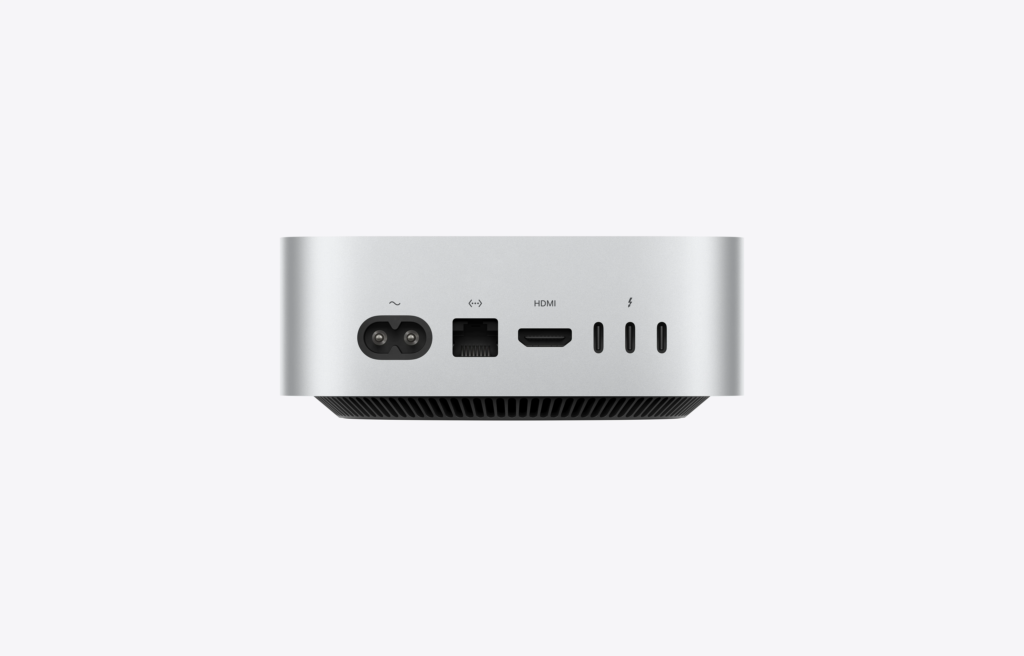
- Back ports: 3 × Thunderbolt, HDMI, Ethernet
- Display support: Up to three external displays depending on configuration
- Operating system: macOS
- Apple Intelligence: Yes
Apple’s current specifications confirm that the M6 Mac mini combines a 12-core CPU, 12-core GPU, Neural Accelerators and a dual 16-core Neural Engine, while M5 Pro configurations offer up to an 18-core CPU, 20-core GPU and 64GB unified memory.
Apple Mac mini Price in India
The Apple Mac mini price in India starts at ₹99,900 for the M6 configuration.
The more powerful Mac mini with M5 Pro starts at ₹2,09,900. Higher memory, storage and networking configurations can push the price significantly higher.
Apple Mac mini Price Overview
| Model | Starting Price in India |
|---|---|
| Mac mini M6 | ₹99,900 |
| Mac mini M5 Pro | ₹2,09,900 |
| M6 with higher memory/storage | Higher |
| M5 Pro with higher memory/storage | Higher |
The base M6 configuration is equipped with 16GB unified memory and 256GB storage, while Apple provides upgrade options for memory and SSD capacity.
Compact 5-Inch Design
The biggest visual change to the Mac mini happened with its compact redesign, and the latest generation continues that approach.
The Mac mini measures just 12.70 × 12.70cm, or 5 × 5 inches. Despite its tiny footprint, Apple has packed desktop-class processors, multiple ports and advanced connectivity into the enclosure.
This makes it easy to place:
- Under a monitor
- Beside a keyboard
- On a small office desk
- In a home studio
- On a shelf
- In a compact workstation
The minimalist silver aluminium enclosure also fits naturally into a variety of desk setups.
Apple Mac mini M6 Performance
The standard Mac mini now gets the M6 chip, which features a 12-core CPU and 12-core GPU.
Apple describes M6 as being designed for everything from everyday productivity to video editing, 3D rendering, gaming and AI workloads.
The M6 includes:
- 12-core CPU
- 12-core GPU
- Neural Accelerators
- Hardware-accelerated ray tracing
- Dual 16-core Neural Engine
- Up to 32GB unified memory
- Up to 170GB/s memory bandwidth
Apple claims the M6 Mac mini can be up to 4.8× faster than the M4 Mac mini in certain workloads.
Of course, real-world performance varies depending on the application, workload and configuration.
M5 Pro for Demanding Users
If the M6 is designed for mainstream and advanced users, the M5 Pro version is aimed at people who regularly push their computers hard.
The M5 Pro configuration can scale up to:
- 18-core CPU
- 20-core GPU
- 16-core Neural Engine
- 64GB unified memory
- 307GB/s memory bandwidth
- Thunderbolt 5
- Support for up to three 6K displays
Apple says M5 Pro can deliver up to 4× faster performance than M4 Pro in certain workloads.
For professional video editors, developers, 3D artists and AI users, this extra performance can make the higher price easier to justify.
Mac mini for AI
AI is one of the major themes of the latest Mac mini generation.
Apple has designed the M6 and M5 Pro chips around AI workloads, with Neural Accelerators and Neural Engine hardware intended to speed up on-device AI processing.
The Mac mini can be used with applications such as:
- Ollama
- LM Studio
- Claude-related AI tools
- Topaz Photo
- Adobe Photoshop
- Pro Tools
- Local AI models
- AI development environments
Apple also highlights the ability to create and run AI agents locally, making the Mac mini particularly interesting for developers and power users experimenting with local AI.
Apple Intelligence and Siri AI
The Mac mini supports Apple’s Apple Intelligence features through macOS.
Apple says the latest Mac mini supports a more capable Siri AI, with features designed around writing, information retrieval, personal context and onscreen awareness.
Apple Intelligence can help with tasks such as:
- Writing and editing
- Summarising information
- Creating content
- Understanding what’s on screen
- Image-related tasks
- Automating workflows
- Using Visual Intelligence
- Creating shortcuts
Apple also emphasises on-device processing and Private Cloud Compute for supported workloads.
Mac mini for Students
The Mac mini can be an excellent desktop for students, particularly if you already own a monitor, keyboard and mouse.
It is powerful enough for:
- Microsoft Office
- Google Workspace
- Web browsing
- Coding
- Graphic design
- Video editing
- Presentations
- Research
- Online classes
- Programming projects
Its small size also makes it easy to fit into a compact study area.
The main thing to remember is that the Mac mini doesn’t include a display or input devices, so the total setup cost can be higher than the computer’s advertised price.
Mac mini for Work From Home
For home-office users, the Mac mini offers an interesting balance between performance and size.
You can connect it to a large monitor and use it for:
- Microsoft Word
- Excel
- PowerPoint
- Zoom
- Slack
- Google Workspace
- Canva
- Web-based applications
- Content management
- Business software
Apple specifically highlights compatibility with applications including Microsoft 365, Google Workspace, WhatsApp, Canva and Notion.
For someone building a permanent desk setup, the Mac mini can be more practical than buying a laptop that spends most of its life connected to a monitor.
Mac mini for Video Editing
The M6 Mac mini is also capable of serious creative work.
It supports applications such as:
- Final Cut Pro
- Adobe Premiere Pro
- Adobe Photoshop
- DaVinci Resolve
- Logic Pro
- Blender
The M6 includes hardware media engines for H.264, HEVC, ProRes and ProRes RAW workflows.
For professional editors working with demanding projects, however, the M5 Pro configuration provides considerably more graphics and memory headroom.
Mac mini for Coding and Development
Developers have plenty of reasons to consider the Mac mini.
It can run:
- Xcode
- Visual Studio Code
- Terminal
- Docker
- Python
- JavaScript development tools
- Local AI models
- Database systems
- Multiple simulators
Apple specifically highlights using the Mac mini for app development and running multiple simulators.
The M5 Pro is particularly appealing for developers working with large projects, local AI models or demanding development environments.
Gaming on Mac mini
Gaming has historically been one of the weaker areas of the Mac ecosystem, but Apple silicon continues to improve the situation.
The latest Mac mini features hardware-accelerated ray tracing, and Apple highlights games including:
- Control Ultimate Edition
- Resident Evil 4
- Cyberpunk 2077
- Mixtape
- Crimson Desert
The experience will still depend heavily on game availability and macOS support, but the hardware is substantially more capable than older Mac mini generations for graphics-intensive workloads.
Ports and Connectivity
One of the best things about the Mac mini is that Apple hasn’t abandoned physical ports in favour of an ultra-minimal design.
The front provides:
- Two USB-C ports
- 3.5mm headphone jack
The rear includes:
- Three Thunderbolt ports
- HDMI
- Ethernet
- Power connection
The M6 model uses Thunderbolt 4, while M5 Pro configurations bring Thunderbolt 5.
This makes it possible to build a workstation around external displays, storage drives, audio equipment, cameras and other peripherals.
Faster Ethernet and Wireless
The latest Mac mini supports 2.5Gb Ethernet, with an option to configure it for 10Gb Ethernet.
Apple also adds Wi-Fi 7 and Bluetooth 6, giving the new generation faster and more modern wireless connectivity.
For users working with network storage, large files or local servers, the upgraded networking capabilities can be particularly useful.
External Display Support
Display support depends on the selected chip and configuration.
The M6 model supports up to:
- Two 6K displays
- One additional 5K display
The M5 Pro can support up to three 6K displays.
This makes the Mac mini suitable for multi-monitor workstations, creative studios and development setups.
Storage Options
Apple offers the Mac mini with several SSD storage choices.
Depending on configuration, buyers can select:
- 256GB
- 512GB
- 1TB
- 2TB
The M5 Pro range offers additional higher-capacity configurations.
One important buying tip: choose your storage carefully when ordering. The Mac mini isn’t designed around user-upgradable internal SSD storage, so purchasing enough capacity from the beginning is usually the safer choice.
Unified Memory
The Mac mini uses Apple’s unified memory architecture.
The M6 model can be configured with up to 32GB unified memory, while M5 Pro models can go up to 64GB.
Which memory should you choose?
16GB:
Good for everyday work, browsing, office applications and general productivity.
24GB:
A sensible choice for heavier multitasking, development and creative applications.
32GB:
Recommended for advanced creative workflows, development and local AI applications.
48GB–64GB:
Better suited to professional workloads, large datasets, advanced AI and demanding production environments.
Mac mini vs MacBook
The biggest difference between the Mac mini and MacBook is portability.
Mac mini advantages
- Smaller desktop footprint
- Excellent performance for the price
- Flexible display choice
- Easy to build a multi-monitor setup
- Plenty of ports
- No built-in screen to pay for
- Excellent for permanent desks
MacBook advantages
- Built-in display
- Keyboard and trackpad included
- Battery powered
- Easy to carry
- Better for travel
If you work mostly from one desk, the Mac mini can be an excellent choice. If you move between home, office and college, a MacBook is likely more practical.
Mac mini: Pros and Cons
Pros
- Extremely compact
- Powerful M6 performance
- M5 Pro option for professionals
- Excellent energy efficiency
- Strong AI capabilities
- Wi-Fi 7 and Bluetooth 6
- 2.5Gb Ethernet
- Optional 10Gb Ethernet
- Multiple USB-C/Thunderbolt ports
- HDMI output
- Up to three external displays
- Excellent macOS ecosystem
- Great for coding and creative work
Cons
- Monitor isn’t included
- Keyboard and mouse aren’t included
- Internal storage isn’t user-upgradable
- Higher configurations become expensive
- Less portable than a MacBook
- M5 Pro models can become very expensive with upgrades
Is Apple Mac mini Worth Buying?
Yes, especially if you already have a monitor and accessories.
The Mac mini’s biggest advantage is that it separates the computer from the rest of your desktop setup.
Instead of paying for a built-in display, keyboard and trackpad, you can use hardware you already own or choose exactly what suits your needs.
The new M6 version also makes the Mac mini substantially more capable for AI, creative applications, coding and gaming, while the M5 Pro version provides serious performance for professional workloads.
For many users, the base M6 Mac mini offers the sweet spot between performance, size and price.
Which Mac mini Should You Buy?
Best for everyday users: M6, 16GB
Choose the base M6 model if you primarily use:
- Web browsing
- Office apps
- Streaming
- Canva
- Photo management
- Light editing
- General productivity
Best for power users: M6, 24GB/32GB
This is the configuration I’d consider for users doing:
- Video editing
- Software development
- Heavy multitasking
- Music production
- Photography
- AI applications
Best for professionals: M5 Pro
Choose M5 Pro if your work involves:
- Professional video production
- 3D rendering
- Large AI models
- Software development at scale
- Advanced graphics
- Large datasets
- Multiple high-resolution displays
Apple Mac mini Review: Final Verdict
The latest Apple Mac mini continues to prove that a desktop computer doesn’t need a huge tower to deliver serious performance.
The new M6 chip brings a 12-core CPU, 12-core GPU, Neural Accelerators and a dual 16-core Neural Engine to Apple’s smallest desktop. For professionals who need more power, the M5 Pro configuration scales much higher, with up to 18 CPU cores, 20 GPU cores and 64GB unified memory.
The compact 5 × 5-inch design, useful front and rear ports, Wi-Fi 7, Bluetooth 6, fast Ethernet and multi-display support make it remarkably flexible.
The biggest limitation is also obvious: you need to supply your own monitor, keyboard and mouse.
But if you already have those accessories, the Mac mini can be one of the most versatile ways to enter Apple’s desktop ecosystem.
Apple Mac mini Rating
Design: ⭐⭐⭐⭐⭐
Performance: ⭐⭐⭐⭐⭐
AI Features: ⭐⭐⭐⭐⭐
Connectivity: ⭐⭐⭐⭐⭐
Software: ⭐⭐⭐⭐⭐
Value for Money: ⭐⭐⭐⭐☆
Upgradeability: ⭐⭐⭐☆☆
Overall Rating: 4.7/5
Frequently Asked Questions
What is the Apple Mac mini price in India?
The latest Mac mini with M6 starts at ₹99,900, while the M5 Pro model starts at ₹2,09,900 in India.
What processor does the latest Mac mini use?
The current Mac mini is available with Apple’s M6 and M5 Pro chips.
How small is the Apple Mac mini?
The Mac mini measures approximately 12.70 × 12.70cm, or 5 × 5 inches.
Does Mac mini come with a monitor?
No. The Mac mini is sold as a desktop computer without a built-in display, keyboard or mouse.
Can I use my existing monitor with Mac mini?
Yes. The Mac mini supports external displays and can connect to a wide variety of compatible monitors through its available ports.
How much RAM does Mac mini have?
The M6 model starts with 16GB unified memory and can be configured up to 32GB. M5 Pro models can be configured with up to 64GB.
Is Mac mini good for video editing?
Yes. The M6 and M5 Pro models are capable of video editing in applications such as Final Cut Pro, Adobe Premiere Pro and DaVinci Resolve. M5 Pro is the better choice for demanding professional projects.
Is Mac mini good for AI?
Yes. The latest Mac mini is designed around AI workloads, with Neural Accelerators, Neural Engine hardware and support for local AI applications and Apple Intelligence.
Does Mac mini support multiple monitors?
Yes. Display support depends on the chip and configuration. M6 supports up to two 6K displays plus one 5K display, while M5 Pro can support up to three 6K displays.
Should I buy Mac mini M6 or M5 Pro?
For most users, M6 is the better value. Choose M5 Pro if you regularly work with demanding video editing, 3D rendering, large AI workloads, professional development or other highly intensive tasks.
The new M6 chip and M5 Pro,