
Choosing the best Canon camera for YouTube videos can be challenging, especially when you are comparing entry-level mirrorless cameras, creator-focused models, and advanced cameras designed for professional video production. The right choice depends on what you record, how much you want to spend, and whether you need features such as 4K recording, reliable autofocus, a flip-out screen, or external microphone support.
Canon offers several strong options for YouTubers, from the affordable EOS R100 to the video-focused EOS R50 V and the more advanced EOS R10 and EOS R7. Each camera serves a different type of creator, so spending more does not automatically mean getting the best camera for your channel.
For this guide, we compare key specifications, creator-friendly features, estimated price ranges, and practical pros and cons to help you make an informed buying decision. The recommendations focus on features that matter for real-world content creation, including talking-head videos, product reviews, travel vlogs, tutorials, and YouTube Shorts.
Our top recommendation: The Canon EOS R50 V is a compelling choice for video-first creators, while the Canon EOS R50 is worth considering if you want a versatile camera for both photography and YouTube videos.
Disclosure: This article contains affiliate links. MotLot may earn a commission if you purchase through eligible links, at no additional cost to you. Product ratings below are editorial assessments for this guide, not verified customer ratings or results from hands-on testing. Prices and offers may change.
Quick Comparison: Best Canon Cameras for YouTube Videos
| Camera | Best for | Video highlights | Approx. India price reference | Editorial rating |
|---|---|---|---|---|
 Canon EOS R50 V | Video-first creators | 4K up to 60p, creator-focused controls | ₹64,000–₹80,000 with kit lens | ★★★★★ 4.8/5 |
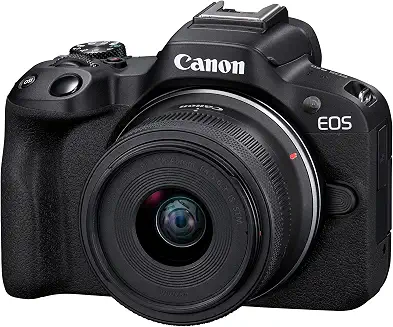 Canon EOS R50 | Beginners and hybrid creators | 4K 30p, Full HD high-frame-rate recording | ₹60,000–₹76,000 with kit lens | ★★★★★ 4.7/5 |
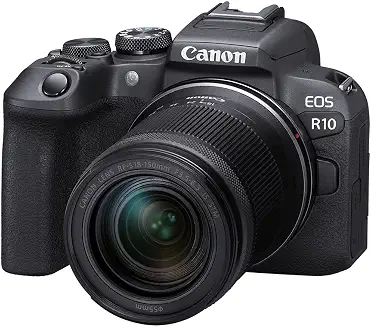 Canon EOS R10 | Growing YouTube channels | 4K recording, advanced autofocus | ₹83,000–₹1,20,000 depending on kit | ★★★★☆ 4.5/5 |
 Canon EOS R100 | Budget-conscious beginners | 4K 25p, Full HD high-frame-rate recording | ₹45,000–₹65,000 with kit lens | ★★★★☆ 4.0/5 |
| Canon EOS R7 | Advanced creators | 4K 60p, in-body image stabilization | ₹1,18,000–₹1,76,000 depending on kit | ★★★★★ 4.7/5 |
| Canon EOS R8 | Full-frame video creators | 4K 60p, full-frame sensor | ₹1,15,000–₹1,45,000 for body-only or selected offers | ★★★★★ 4.6/5 |
Price references are indicative, based on published Canon India pricing and observed retailer listings. They are not guaranteed live Amazon prices. Confirm the exact camera kit, included lens, warranty, and seller price before ordering. Sources: Canon India’s camera catalogue and online store.
Shop your preferred Canon camera:
- Check Canon EOS R50 V offers on Amazon India
- Check Canon EOS R50 offers on Amazon India
- Check Canon EOS R10 offers on Amazon India
1. Canon EOS R50 V — Best Overall Canon Camera for YouTube Videos
Editorial rating: ★★★★★ 4.8/5
The Canon EOS R50 V is designed specifically for content creators who prioritize video. Its dedicated recording controls, vertical-video support, and video-focused shooting features make it a strong choice for YouTubers who regularly create product reviews, tutorials, talking-head videos, and short-form content.
Unlike a camera primarily designed for photography, the R50 V emphasizes video workflows. It offers internal 10-bit 4K 60p recording, Canon Log 3, Dual Pixel CMOS AF II, and a fully articulating touchscreen. The supplied power-zoom lens kit is particularly convenient for creators who want controlled zooming while recording.
Key features
- 24.2MP APS-C CMOS sensor.
- Internal 10-bit 4K 60p recording.
- Canon Log 3 for compatible color-grading workflows.
- Dual Pixel CMOS AF II autofocus.
- Vari-angle touchscreen for self-recording.
- Dedicated video controls and vertical-shooting features.
- Interchangeable RF/RF-S lens system.
Pros
- Excellent feature set for video-focused creators.
- Flexible framing for YouTube Shorts and horizontal videos.
- Useful video monitoring and recording controls.
- Interchangeable lenses provide room to expand your setup.
Cons
- Costs more than an entry-level camera.
- The compact APS-C sensor is not full-frame.
- 4K 60p and advanced recording modes can require more storage and editing power.
- You may need additional lighting and audio accessories for a complete setup.
Who should buy it?
Choose the EOS R50 V if video is your primary goal and you want a camera that supports a more advanced creator workflow without moving into an expensive full-frame system.
Before buying, confirm whether the listing includes the RF-S14-30mm lens or is body-only.
2. Canon EOS R50 — Best Canon Camera for YouTube Beginners
Editorial rating: ★★★★★ 4.7/5
The Canon EOS R50 is an excellent option for creators who want one camera for YouTube videos, photography, family content, and travel. Its 24.2MP APS-C sensor, 4K recording, subject-detection autofocus, and fully articulating touchscreen make it approachable for beginners while leaving room to develop your skills.
The R50 records 4K at up to 30p, using 6K oversampling for detailed footage in its supported mode. It can also record Full HD at higher frame rates for slow-motion content.
For a new YouTuber, the biggest benefit is versatility. You can use the camera for a talking-head setup today and expand into product photography, interviews, or travel videos later.
Key features
- 24.2MP APS-C CMOS sensor.
- 4K 30p video recording.
- Dual Pixel CMOS AF II.
- Eye and subject detection.
- Fully articulating touchscreen.
- External microphone input.
- Compact body suitable for travel and everyday recording.
Pros
- Strong balance of price and performance.
- Good autofocus for solo creators.
- Suitable for video and photography.
- Compact and beginner-friendly.
- Interchangeable lens system.
Cons
- Does not offer the same dedicated video controls as the R50 V.
- 4K recording is limited to 30p.
- No in-body image stabilization.
- The kit lens may be limiting in dimly lit rooms.
Who should buy it?
The EOS R50 is a smart choice if you want a dependable all-rounder for YouTube, especially for product reviews, educational videos, interviews, and indoor talking-head content.
Buying tip: For a beginner, the 18–45mm kit lens is a practical starting point. You can upgrade to a brighter lens later if you need better background blur or low-light performance.
3. Canon EOS R10 — Best for Growing YouTube Channels
Editorial rating: ★★★★☆ 4.5/5
The Canon EOS R10 is designed for creators who want more advanced camera controls, fast autofocus, and flexibility across different types of content. It is especially appealing if your channel includes both video and photography, such as technology reviews, event coverage, travel content, or behind-the-scenes footage.
Its 24.2MP APS-C sensor and advanced autofocus make it a capable hybrid camera. Supported 4K recording modes offer detailed footage, while the interchangeable lens system gives you more control over framing and image style.
The R10 is not exclusively a video camera, but its combination of performance and portability makes it a useful upgrade for creators who have outgrown a basic setup.
Key features
- 24.2MP APS-C CMOS sensor.
- 4K video recording, including 4K 60p in a cropped mode.
- Dual Pixel CMOS AF II.
- Subject detection and tracking.
- Fully articulating touchscreen.
- External microphone input.
- Interchangeable RF/RF-S lenses.
Pros
- Strong hybrid performance for photo and video.
- Fast, capable autofocus.
- Useful for travel and product content.
- Offers more advanced shooting controls.
- Good potential for a growing creator’s workflow.
Cons
- More expensive than the entry-level R100.
- Some 4K modes have a crop.
- No in-body image stabilization.
- Advanced features can take time to learn.
Who should buy it?
Choose the EOS R10 if you create several types of content and want a camera that can handle photography, video, and more demanding shooting situations.
4. Canon EOS R100 — Best Budget Canon Camera for YouTube
Editorial rating: ★★★★☆ 4.0/5
If your budget is limited, the Canon EOS R100 offers an entry point into Canon’s RF mirrorless system. It is suitable for beginners who want interchangeable lenses and are comfortable working with a simpler set of video features.
The camera uses a 24.1MP APS-C sensor and supports 4K recording at up to 25p. However, its 4K mode uses a substantial crop and autofocus capabilities are more limited than those of the R50 and R50 V. These trade-offs are important if you plan to record yourself at arm’s length or create movement-heavy videos.
For a fixed indoor setup, classroom videos, basic tutorials, and simple product demonstrations, the R100 can still be a useful option.
Key features
- 24.1MP APS-C CMOS sensor.
- 4K 25p video recording.
- Full HD recording at higher frame rates.
- Interchangeable RF/RF-S lenses.
- Compact mirrorless body.
- Basic autofocus and manual controls.
Pros
- Entry-level pricing compared with more advanced models.
- Interchangeable lenses.
- Suitable for learning photography and video.
- Useful for controlled, stationary recording setups.
Cons
- No fully articulating touchscreen.
- Limited autofocus capabilities compared with newer creator-oriented models.
- Cropped 4K recording.
- Less convenient for solo vlogging and advanced video workflows.
Who should buy it?
Choose the R100 if you are starting with a tight budget and mainly record stationary videos. If you regularly film yourself, need a flip-out screen, or expect to use autofocus extensively, consider saving for the EOS R50.
5. Canon EOS R7 — Best Advanced APS-C Camera for YouTube
Editorial rating: ★★★★★ 4.7/5
The Canon EOS R7 is a more advanced APS-C mirrorless camera for creators who need additional controls, strong photography performance, and capable video features. It is particularly useful for travel channels, outdoor content, wildlife videos, and creators who need more reach from their lenses.
One important advantage is its in-body image stabilization, which can help reduce camera shake with compatible shooting setups. The camera also supports 4K 60p recording and Canon Log 3 in supported modes, making it suitable for more demanding production workflows.
However, it is a bigger investment than most beginners need.
Key features
- 32.5MP APS-C CMOS sensor.
- 4K video recording up to 60p.
- In-body image stabilization.
- Canon Log 3 in supported recording modes.
- Dual card slots.
- Advanced autofocus and subject tracking.
Pros
- Useful stabilization for handheld shooting.
- High-resolution photos and versatile video features.
- Good option for travel and outdoor content.
- Advanced controls for experienced creators.
- Room to grow into more demanding projects.
Cons
- Higher price than entry-level Canon cameras.
- More features than many beginners need.
- Lens and accessory costs can increase the total budget.
- Stabilization does not eliminate all movement or replace good technique.
Who should buy it?
Consider the EOS R7 if you are an experienced creator who also shoots photography, outdoor footage, or moving subjects and wants in-body stabilization alongside advanced controls.
6. Canon EOS R8 — Best Full-Frame Canon Camera for Video Creators
Editorial rating: ★★★★★ 4.6/5
The Canon EOS R8 is worth considering if you want a full-frame sensor and advanced video capabilities. Its full-frame design can offer advantages for low-light work and shallow depth of field when paired with an appropriate lens.
The camera supports 4K 60p recording with 6K oversampling in supported modes, Canon Log 3, and advanced autofocus. These features can be helpful for creators producing cinematic talking-head videos, interviews, and professional-looking product content.
The key limitation is that the EOS R8 does not have in-body image stabilization. For handheld shooting, lens stabilization, digital stabilization, or a tripod may be important.
Key features
- 24.2MP full-frame CMOS sensor.
- 4K 60p recording in supported modes.
- Canon Log 3.
- Advanced subject-detection autofocus.
- Fully articulating touchscreen.
- External microphone input.
Pros
- Full-frame image quality and depth-of-field flexibility.
- Strong autofocus for video.
- Detailed 4K recording.
- Suitable for more advanced production workflows.
Cons
- Higher total system cost.
- Full-frame lenses can be expensive.
- No in-body image stabilization.
- May be excessive for a beginner’s first YouTube camera.
Who should buy it?
Choose the EOS R8 if you have a larger budget, understand lens selection, and want the advantages of a full-frame system for more polished video production.
Which Canon Camera Should You Buy? Comparison by Creator Type
| Your main goal | Recommended camera | Why it makes sense |
|---|---|---|
| Start a YouTube channel on a budget | EOS R100 | Entry-level mirrorless system |
| Make your first serious camera purchase | EOS R50 | Versatile and beginner-friendly |
| Focus primarily on video | EOS R50 V | Creator-focused recording features |
| Record both photos and videos | EOS R10 | Advanced hybrid performance |
| Shoot travel and outdoor videos | EOS R7 | In-body stabilization and advanced controls |
| Create full-frame cinematic content | EOS R8 | Full-frame sensor and advanced 4K |
For most new YouTubers, the choice comes down to the EOS R50 V and EOS R50. The former is more video-focused, while the latter is a versatile camera for creators who want to take photographs as well.
What Features Matter Most When Buying a Canon YouTube Camera?
A camera’s resolution is important, but several other features can make a bigger difference to your recording experience.
1. 4K Video Recording
4K is useful for detailed footage and gives you more flexibility when cropping during editing. Check the maximum frame rate, recording limits, and whether the camera crops the image in specific modes.
2. Autofocus Performance
Reliable face and eye detection can save time when recording alone. This is particularly important for tutorials, product reviews, and talking-head videos.
3. Flip-Out Screen
A fully articulating screen helps you monitor your framing while standing in front of the camera. It is a valuable feature for solo creators and vloggers.
4. External Microphone Support
A microphone input lets you use a compatible external microphone for clearer speech. Before purchasing, check the camera’s input type and whether you need an adapter or separate audio equipment.
5. Image Stabilization
In-body stabilization can reduce camera shake, while optically stabilized lenses and electronic stabilization can also help. The effectiveness varies with the camera, lens, and recording mode.
6. Lens Compatibility
Canon RF and RF-S lenses provide different focal lengths and creative options. A wide lens is useful for self-recording in small rooms, while a brighter lens can help with low-light shooting and background blur.
7. Battery Life and Recording Limits
If you record long tutorials, interviews, or livestreams, check battery performance, USB power options, heat management, and recording limits.
Best Accessories for Canon YouTube Cameras
A good camera is only one part of a reliable YouTube setup. Consider these accessories when planning your total budget.
| Accessory | Why you need it | Suggested starting point |
|---|---|---|
| External microphone | Clearer voice recordings | Compatible shotgun or wireless microphone |
| Tripod | Stable framing | Sturdy tripod with suitable camera capacity |
| LED light | More consistent indoor lighting | Adjustable LED panel or soft light |
| Memory card | Reliable video recording | Card that meets your camera’s speed requirements |
| Extra battery | Longer recording sessions | Compatible Canon battery |
| External SSD | Storage and editing | Fast SSD with enough capacity |
| Wide-angle lens | Easier self-recording | Compatible wide RF/RF-S lens |
Tip: If your videos look flat or your voice sounds distant, improving lighting and audio may provide a bigger practical improvement than upgrading from one capable 4K camera to another.
Frequently Asked Questions
Which Canon camera is best for YouTube beginners?
The Canon EOS R50 is a strong all-round option for beginners because it combines 4K video, capable autofocus, and a flip-out screen. The EOS R100 is a more budget-conscious alternative, while the EOS R50 V is worth considering if video is your main priority.
Is the Canon EOS R50 V better than the EOS R50 for YouTube?
The EOS R50 V is designed around video creation and provides more dedicated video features, including internal 10-bit 4K 60p recording and Canon Log 3. The EOS R50 is more versatile for creators who also want a camera for photography. Your preferred recording workflow should determine which one offers better value.
Which Canon camera records 4K video?
Several Canon cameras support 4K recording, including the EOS R50 V, EOS R50, EOS R10, EOS R7, and EOS R8. Their frame rates, cropping, color options, and recording capabilities differ, so check the specifications for the exact mode you plan to use.
Is the Canon EOS R100 good for YouTube?
Yes, for simple and budget-friendly recording setups. However, its cropped 4K mode, less advanced autofocus, and lack of a fully articulating screen make it less convenient for solo vloggers than the EOS R50 or R50 V.
Can I use a Canon mirrorless camera for YouTube Shorts?
Yes. Compatible Canon cameras can be used to create vertical content. You can record vertically or crop horizontal footage during editing, depending on the camera, mounting setup, and final video format.
Do I need an expensive lens for YouTube videos?
No. A kit lens can be enough to get started, especially in a well-lit room. A brighter lens may be useful if you record in low light or want more background blur. Check focal length and autofocus compatibility before buying.
Are these ratings customer review scores?
No. The star ratings in this article are editorial assessments intended to compare each camera’s suitability for YouTube. They are not verified Amazon customer ratings, and they do not represent hands-on laboratory testing. Check current retailer reviews separately before purchasing.
Final : Best Canon Cameras for YouTube Videos
Canon has suitable options for creators at different stages, but the best choice depends on the type of videos you plan to make.
- Best for video-first creators: Canon EOS R50 V.
- Best all-rounder for beginners: Canon EOS R50.
- Best for a growing hybrid channel: Canon EOS R10.
- Best budget option: Canon EOS R100.
- Best advanced APS-C option: Canon EOS R7.
- Best full-frame option: Canon EOS R8.
For most creators, the Canon EOS R50 V is an appealing choice because its video-oriented design supports a range of modern YouTube workflows. If you want to photograph products and record videos with the same camera, the EOS R50 is a sensible alternative.
Before ordering, compare the complete kit price, lens included, warranty, seller reputation, return policy, and recording features. Also remember to budget for audio, lighting, and storage.
Related keywords: Canon camera for YouTube beginners, best Canon vlogging camera, Canon EOS R50 V review, Canon EOS R50 vs R50 V, Canon 4K camera for YouTube, best Canon mirrorless camera for video
“`