
Home and business security has changed significantly in recent years. Traditional CCTV systems that simply recorded everything to a hard drive are increasingly being replaced by smarter security cameras that can detect movement, identify people, send instant alerts, and even recognize familiar faces.
Wireless security CCTV camera systems with facial recognition features are particularly interesting for homeowners, offices, shops, apartments, and small businesses that want more intelligent surveillance without installing extensive cabling.
Instead of receiving an alert every time a person walks past your camera, a facial-recognition-enabled system can potentially distinguish between familiar and unfamiliar individuals. This can make security alerts more meaningful while reducing unnecessary notifications.
In this post, we’ll explain how wireless CCTV systems with facial recognition work, what features matter, their advantages and limitations, and what you should consider before buying one.
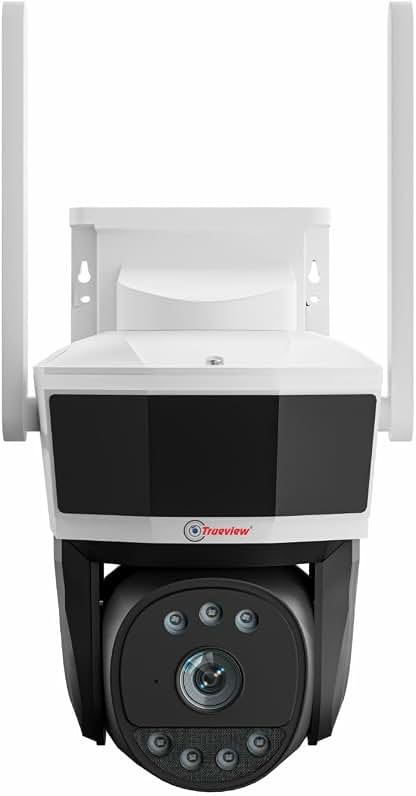
What Is a Wireless CCTV Camera System with Facial Recognition?
A wireless CCTV camera system uses Wi-Fi or another wireless connection to transmit video without requiring a traditional wired video connection between every camera and a recorder.
When facial recognition is added, the system uses computer vision and artificial intelligence to analyze faces appearing in the camera’s field of view.
Depending on the camera and software, you may be able to create a database of recognized people. The system can then attempt to determine whether a detected face matches someone already registered.
For example, a smart camera at your front door might identify a registered family member and generate a different notification when an unfamiliar person approaches.
A typical system can include:
- Wireless indoor or outdoor cameras
- AI-powered person detection
- Facial recognition
- Motion detection
- Night vision
- Two-way audio
- Smartphone notifications
- Cloud or local video storage
- A central hub or NVR on some systems
- Security and privacy controls
The exact capabilities vary considerably between manufacturers and models, so facial recognition should not be treated as a standard feature across all “AI CCTV” cameras.
How Does Facial Recognition Work in CCTV Cameras?
Facial recognition generally involves several stages.
1. Face Detection
The camera first detects whether a human face is visible in the video.
This is different from facial recognition. Detection answers the question:
“Is there a face?”
Recognition attempts to answer:
“Whose face is it?”
2. Image Analysis
The camera or connected software analyzes characteristics of the detected face. Depending on the system, this processing may occur on the camera itself, a home hub, an NVR, or a cloud server.
3. Face Matching
The system compares the detected face against a stored database or enrolled profile.
If the similarity reaches the system’s configured threshold, it may classify the person as a recognized individual.
4. Alert or Automation
Depending on the product, the camera can then trigger an event such as:
- Sending a smartphone notification
- Recording the event
- Creating a familiar-person event
- Activating another security device
- Triggering an automation
- Logging the event for later review
Because lighting, viewing angle, image quality, masks, glasses, movement, and other factors can affect recognition, facial recognition should be considered an assistance technology rather than a guaranteed identity verification system.
Why Choose Wireless CCTV Cameras?
One of the biggest advantages of wireless security cameras is installation flexibility.
A conventional wired CCTV installation can require video cables, network cables, conduits, drilling, and professional installation.
Wireless cameras can often be installed in locations where running cables would be difficult.
Easier Installation
For many homes and small businesses, a Wi-Fi camera can be installed considerably more easily than a fully wired system.
This is particularly useful for:
- Apartments
- Rental properties
- Small offices
- Shops
- Garages
- Home entrances
- Temporary security setups
You still generally need to consider power requirements unless you choose a battery-powered model.
Flexible Camera Placement
Wireless cameras can be repositioned more easily when your security requirements change.
For example, you might initially install a camera facing the main entrance and later move it toward a parking area or backyard.
Smartphone Access
Many modern systems allow users to view live video, review recordings, receive alerts, and configure settings through a smartphone application.
This means you can check your property remotely when you’re away.
Key Features to Look For
Not every wireless facial-recognition CCTV system offers the same experience. Before buying, consider the following features.
1. Reliable Facial Recognition
Facial recognition should be one of your primary considerations if this is the reason you’re buying the camera.
Look for systems that clearly explain:
- How many faces can be registered
- Whether recognition works locally or through the cloud
- Whether there are recurring subscription fees
- Whether familiar-person recognition is included
- How recognition events are displayed
- Whether facial data can be deleted
Be cautious of products that advertise “AI” without clearly explaining what the AI actually does.
2. High-Resolution Video
Facial recognition depends heavily on image quality.
A higher-resolution camera can provide more useful facial detail, particularly when a person is some distance away.
For general residential security, 2K and 4K cameras can be attractive options, although resolution alone does not guarantee good recognition.
Lens quality, lighting, HDR, image processing, and camera positioning are equally important.
3. Night Vision
Security threats don’t disappear after sunset.
Look for cameras with capable infrared night vision or color night vision technology.
If facial recognition is important, pay particular attention to how the camera handles faces in low-light conditions.
4. Person Detection
Person detection can make facial recognition more useful.
Instead of treating every moving object as a security event, AI-based person detection can help distinguish humans from other movement such as:
- Pets
- Tree branches
- Vehicles
- Shadows
- Insects
This can significantly reduce unnecessary notifications.
5. Two-Way Audio
Two-way audio lets you communicate with someone near the camera.
It can be useful for:
- Talking to visitors
- Giving delivery instructions
- Warning unwanted visitors
- Communicating with employees
- Checking on family members
6. Local Storage
Cloud storage can be convenient, but local storage provides another option for managing recordings.
Depending on the system, local storage may use:
- microSD cards
- NVRs
- Network storage
- Manufacturer-specific hubs
A camera offering both local and cloud storage can provide greater flexibility.
7. Cloud Subscription Requirements
Some smart camera systems offer advanced AI features only with a paid subscription.
Before purchasing, determine whether facial recognition requires a monthly or annual plan.
Calculate the total ownership cost rather than looking only at the camera’s initial price.
8. Strong Wireless Connectivity
A wireless camera is only as useful as its network connection.
Check your Wi-Fi signal at the intended installation location before purchasing.
For larger properties, mesh Wi-Fi or a dedicated access point may improve reliability.
9. Weather Resistance
Outdoor cameras need to withstand environmental conditions.
Look for an appropriate IP rating and consider exposure to:
- Heavy rain
- Dust
- Humidity
- Heat
- Direct sunlight
For Indian homes, weather resistance can be especially important in areas exposed to monsoon rain and high summer temperatures.
10. Data Security
Facial recognition involves particularly sensitive information.
Look for security features such as:
- Encrypted communication
- Secure account authentication
- Two-factor authentication
- Regular firmware updates
- Privacy controls
- Clear data-retention policies
A camera should not become a new security vulnerability in your home.
Wireless vs Wired CCTV: Which Is Better?
Both systems have advantages.
| Feature | Wireless CCTV | Wired CCTV |
|---|---|---|
| Installation | Generally easier | More complex |
| Cabling | Minimal | Extensive |
| Flexibility | High | Lower |
| Network dependency | Usually higher | Can be lower |
| Power | Battery or cable depending on model | Usually wired |
| Expansion | Often convenient | May require additional cabling |
| Long-term stability | Depends on Wi-Fi/network | Generally very stable |
| Best for | Homes, apartments, small businesses | Larger permanent installations |
Wireless isn’t automatically better.
If you are securing a large property and want maximum reliability, a professionally installed wired system may still make more sense.
For renters, apartments, and smaller properties, wireless cameras can be much more convenient.
Facial Recognition vs Person Detection
These technologies are often confused.
Person detection identifies an object as a human.
For example:
“A person is standing near your front door.”
Facial recognition attempts to determine whether the person’s face matches a known profile.
For example:
“This face appears to match a registered person.”
A system can therefore have excellent person detection without offering facial recognition.
If facial recognition is your priority, verify that the product specifically supports it rather than assuming that an “AI camera” includes the feature.
Benefits of Facial Recognition CCTV
More Relevant Security Alerts
Instead of treating every detected person equally, a smart system can potentially differentiate familiar and unfamiliar faces.
Faster Event Identification
Searching through hours of CCTV footage can be frustrating.
Facial recognition and AI event categorization can make it easier to locate relevant events.
Convenient Home Monitoring
Families can potentially use familiar-person recognition to understand who has arrived without continuously monitoring a live camera feed.
Useful for Small Businesses
Businesses may use intelligent surveillance to monitor entrances, staff areas, or restricted locations.
However, businesses should pay particular attention to applicable privacy and data-protection requirements before deploying facial recognition.
Limitations You Should Know
Facial recognition sounds impressive, but it isn’t perfect.
Recognition Accuracy Can Vary
A face may not be recognized correctly because of:
- Poor lighting
- Low camera angle
- Face coverings
- Sunglasses
- Motion blur
- Partial visibility
- Significant changes in appearance
- Poor network conditions
Privacy Concerns
Facial data can be more sensitive than ordinary video footage.
Before enabling facial recognition, understand where the data is processed, how it is stored, who can access it, and how long it is retained.
Subscription Costs
Advanced AI capabilities may be locked behind paid plans.
A low-cost camera can therefore become considerably more expensive over several years.
False Positives and False Negatives
No facial recognition system should be assumed to be infallible.
A system may incorrectly identify someone as a registered person or fail to recognize a familiar individual.
For this reason, important security decisions should not depend exclusively on automated facial recognition.
Are Facial Recognition CCTV Cameras Good for Home Security?
For many homeowners, they can be a useful addition to a broader security setup.
A good system can combine:
Person detection + facial recognition + motion alerts + night vision + two-way audio + secure recording
This combination can provide more useful information than basic motion-triggered CCTV.
However, camera placement remains extremely important.
A premium camera installed at the wrong height or facing direct sunlight may perform worse than a less expensive camera positioned correctly.
Best Places to Install Wireless Facial Recognition Cameras
Common locations include:
Front Door
One of the best locations because visitors naturally approach the camera.
Driveway
Useful for monitoring vehicles and people approaching the property.
Garage
Can provide an additional layer of security around vehicles and storage areas.
Main Entrance of a Small Business
Facial recognition may help organize entrance events, but businesses should carefully consider privacy obligations.
Apartment Entrance
Wireless cameras can be convenient where running cables isn’t practical, subject to building rules and privacy considerations.
How to Improve Facial Recognition Accuracy
Even a sophisticated AI camera benefits from good installation.
Position the Camera Correctly
Avoid mounting the camera too high if facial identification is important.
The camera should have a reasonably clear view of people’s faces as they approach.
Improve Lighting
Avoid placing the camera directly toward a strong light source.
A well-lit entrance can improve image quality significantly.
Keep the Lens Clean
Dust, water droplets, and fingerprints can reduce image clarity.
Use the Correct Detection Zone
Configure activity zones so the camera focuses on areas where people actually approach.
Maintain Firmware
Manufacturers can improve AI performance and security through firmware and software updates.
What Should You Consider Before Buying?
Ask yourself these questions:
Do I need facial recognition or just person detection?
If you simply want alerts when someone approaches, person detection may be enough.
Do I want local storage?
Local recording can reduce dependence on cloud services.
Am I comfortable with a subscription?
Check whether important AI features require recurring payments.
How strong is my Wi-Fi?
Poor connectivity can cause frustrating camera performance.
Will the camera be indoors or outdoors?
Outdoor installations require suitable weather protection.
How important is privacy?
If facial recognition is enabled, review the manufacturer’s data practices carefully.
Wireless CCTV Buying Checklist
Before purchasing, look for:
- Full HD, 2K, or 4K video
- Facial recognition support
- Person detection
- Night vision
- HDR or strong low-light performance
- Two-way audio
- Motion zones
- Local storage option
- Cloud storage option if needed
- Secure mobile application
- Two-factor authentication
- Firmware updates
- Strong Wi-Fi connectivity
- Outdoor weather resistance where required
- Transparent subscription pricing
- Clear privacy and data-retention policies
Final Thought
Wireless security CCTV camera systems with facial recognition features represent an important step beyond traditional motion-triggered surveillance.
The biggest advantage isn’t simply being able to recognize a face. It’s the combination of AI-powered detection, smarter notifications, remote monitoring, high-quality video, and flexible wireless installation.
For homeowners and small businesses, a carefully selected system can make everyday security monitoring more convenient and less dependent on manually reviewing hours of footage.
That said, facial recognition shouldn’t be treated as a perfect identification technology. Camera positioning, lighting, network reliability, privacy practices, software quality, and ongoing costs can have just as much impact on the overall experience.
If you’re shopping for a wireless CCTV system, prioritize reliable person detection, good image quality, secure storage, strong privacy controls, and transparent AI features rather than choosing a camera solely because it has the “AI” label.
Frequently Asked Questions
Does every wireless CCTV camera support facial recognition?
No. Many wireless cameras offer motion detection or person detection without facial recognition. Always verify the specific model’s supported AI features.
Does facial recognition work at night?
It can, but performance depends on the camera’s sensor, infrared illumination, lighting conditions, distance, and the angle at which a person’s face is captured.
Do facial recognition cameras require Wi-Fi?
Many consumer wireless cameras use Wi-Fi, but some systems use proprietary wireless connections or dedicated hubs. Check the connectivity requirements before purchasing.
Is facial recognition better than motion detection?
They serve different purposes. Motion detection identifies movement, person detection identifies humans, while facial recognition attempts to match a detected face to a known profile.
Can wireless CCTV cameras record without the internet?
Some models support local recording and can continue recording during an internet outage, although remote viewing and cloud-based features may stop working. Check the manufacturer’s specifications.
Are wireless CCTV cameras secure?
They can be, but security depends on the camera, network, account protection, firmware, and manufacturer’s data practices. Use strong passwords, enable two-factor authentication where available, keep firmware updated, and secure your Wi-Fi network.
Are facial recognition CCTV cameras worth buying?
They can be worthwhile if you specifically want smarter person identification and more useful alerts. If you only need basic home monitoring, a good person-detection camera may provide better value without the additional complexity of facial recognition.
Top Camera Systems Upto 45% OFF