
The Canon EOS R50 V Smartchoice Mirrorless Camera is designed for a generation of creators who want better video quality than a smartphone can provide without carrying a large professional camera setup.
Built around an APS-C sensor and Canon’s RF mount, the EOS R50 V combines interchangeable-lens flexibility with features aimed specifically at YouTubers, vloggers, livestreamers, product reviewers, and social media creators.
Unlike a conventional entry-level mirrorless camera, the EOS R50 V places a much stronger emphasis on video. Its creator-focused controls, vertical video support, Canon’s Dual Pixel CMOS AF II autofocus system, 4K video capabilities, and flexible lens ecosystem make it an interesting choice for anyone building a serious content-creation setup.
The Smartchoice version can be particularly attractive for buyers looking for a bundled package rather than purchasing the camera body and accessories separately.
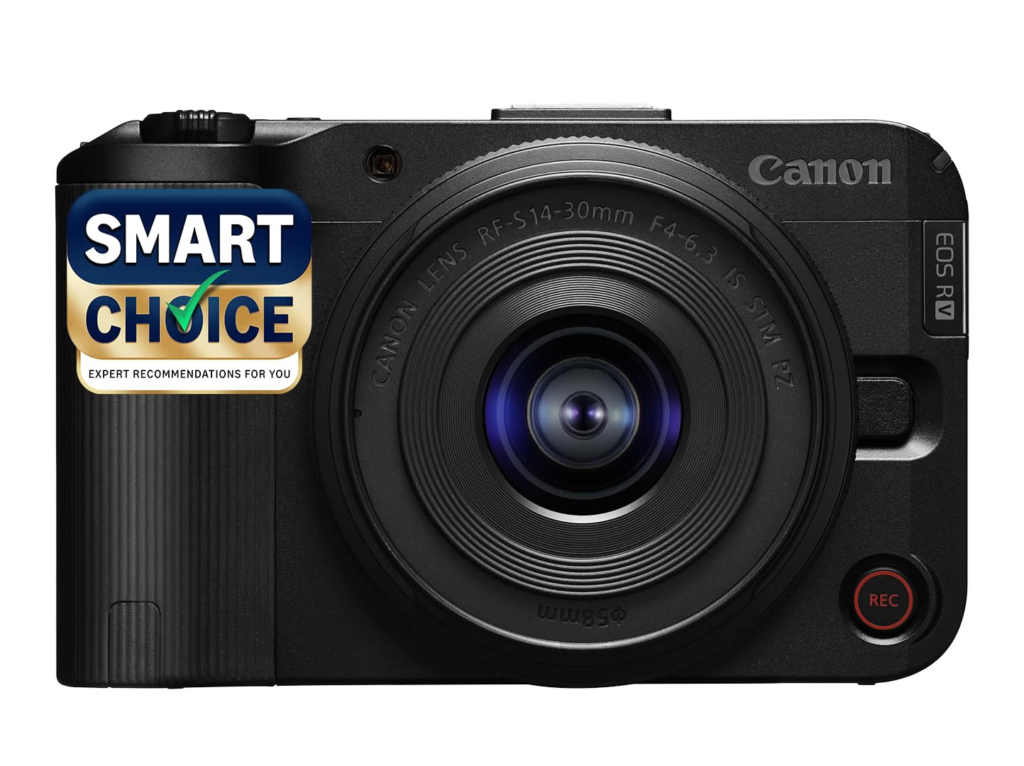
But does the Canon EOS R50 V make sense for beginners, and how does it compare with Sony and other creator-focused cameras?
Let’s take a closer look.
Canon EOS R50 V: Quick Overview
| Feature | Canon EOS R50 V |
|---|---|
| Camera Type | APS-C Mirrorless |
| Sensor | APS-C CMOS |
| Resolution | Approx. 24.2MP |
| Processor | DIGIC X |
| Lens Mount | Canon RF |
| Autofocus | Dual Pixel CMOS AF II |
| Video | Up to 4K 60p |
| Slow Motion | Full HD 120p |
| Screen | Vari-angle touchscreen |
| Stabilization | Digital Movie IS / Lens IS |
| Microphone | Built-in stereo microphone |
| External Mic | Yes |
| Headphone Output | Yes |
| Connectivity | Wi-Fi, Bluetooth, USB-C |
| Lens Options | Canon RF/RF-S ecosystem |
| Best For | YouTube, vlogging, livestreaming and content creation |
What Is the Canon EOS R50 V?
The Canon EOS R50 V is a creator-oriented mirrorless camera based on Canon’s EOS R system.
The “V” is important.
Canon has positioned the camera toward people who create video regularly rather than simply photographing family events.
That means the camera focuses on features such as:
- Video recording
- Vertical video
- Livestreaming
- Subject tracking
- Product demonstrations
- External audio
- Self-recording
- Quick-access video controls
At the same time, it retains the advantages of a mirrorless camera.
You can change lenses depending on the type of content you’re creating.
Start with a standard zoom and later move to a wide-angle lens, fast prime, macro lens, or telephoto lens as your needs develop.
24.2MP APS-C Sensor
At the heart of the EOS R50 V is an approximately 24.2MP APS-C CMOS sensor.
This is an excellent sensor size for a creator camera.
APS-C sits between smaller smartphone and compact-camera sensors and larger full-frame sensors.
For content creators, it provides a useful balance between:
- Image quality
- Low-light performance
- Background separation
- Camera size
- Lens availability
- Overall cost
The 24.2MP resolution is also more than enough for everyday photography.
You can use the R50 V for:
- Portraits
- Travel photography
- Product photography
- Food photography
- Street photography
- Family photos
- YouTube thumbnails
- Website content
So although the camera is primarily designed for video, it isn’t limited to video.
Canon DIGIC X Processor
The EOS R50 V uses Canon’s DIGIC X image processor.
This processor handles many of the camera’s core operations, including image processing, autofocus and video processing.
For creators, processing power is particularly important because modern cameras need to handle high-resolution video while simultaneously tracking subjects and managing exposure.
The DIGIC X platform gives the R50 V the processing foundation required for its creator-focused features.
Canon EOS R50 V Video Quality
Video is where the EOS R50 V is designed to stand out.
The camera supports high-resolution 4K video, including 4K recording at higher frame rates in supported modes.
This makes it suitable for:
- YouTube videos
- Travel vlogs
- Product reviews
- Tutorials
- Interviews
- Online courses
- Social media videos
- Short films
- Livestreaming
For creators upgrading from a smartphone, the combination of an APS-C sensor and interchangeable lenses can provide a noticeable increase in creative flexibility.
4K 60p Recording
One of the most useful video features is 4K 60p recording.
Recording at 60 frames per second gives you smoother motion and additional flexibility during editing.
It can be particularly useful for:
Travel Videos
Moving vehicles, walking sequences and fast-changing scenery benefit from smoother footage.
Sports
Higher frame rates make fast action easier to capture.
Product Videos
Smooth camera movements can make demonstrations look more polished.
Social Media
You can record high-quality footage and create shorter clips during editing.
For creators who want one camera capable of handling both standard YouTube videos and more dynamic B-roll, 4K 60p is a valuable feature.
Full HD 120fps Slow Motion
The R50 V can also record Full HD high-frame-rate footage, allowing creators to produce slow-motion sequences.
This can be useful for:
- Fashion videos
- Food preparation
- Travel B-roll
- Fitness content
- Sports
- Product demonstrations
- Cinematic sequences
Slow motion is not something you’ll necessarily use in every video, but when used appropriately, it can make ordinary footage more engaging.
Canon Dual Pixel CMOS AF II
Autofocus is critical for a creator camera.
If you’re filming yourself, there may be nobody behind the camera to adjust focus.
The EOS R50 V uses Canon’s Dual Pixel CMOS AF II autofocus technology, with subject detection and tracking designed to keep people and other subjects in focus.
This can be especially helpful when:
- Speaking directly to the camera
- Walking toward the camera
- Demonstrating products
- Recording interviews
- Shooting moving subjects
- Creating tutorials
Reliable autofocus means you can spend less time worrying about whether your face is in focus and more time concentrating on your content.
Eye and Subject Detection
Canon’s subject-detection technology is another useful feature for creators.
When you’re recording a person, the autofocus system can detect and track the subject to help maintain focus.
For solo creators, this can make a significant difference.
Place the camera on a tripod, press record and start presenting.
You don’t necessarily need an assistant to monitor focus throughout the recording.
Product Reviewers Will Love the R50 V
If you run a technology, beauty, cooking, or product-review channel, the EOS R50 V has several features that can simplify your workflow.
Product-focused shooting requires the camera to alternate between the presenter’s face and the item being demonstrated.
A creator-oriented autofocus system makes these transitions easier.
This is useful for:
- Smartphone reviews
- Laptop reviews
- Camera reviews
- Beauty products
- Kitchen appliances
- Gadgets
- Food products
- Online-store videos
For product creators, autofocus isn’t merely a convenience—it can save editing time.
Vari-Angle Touchscreen
The EOS R50 V features a vari-angle touchscreen, which is almost essential for a modern vlogging camera.
The display can be flipped toward the front of the camera so you can see yourself while recording.
This allows you to check:
- Framing
- Focus
- Composition
- Exposure
- Background
- Camera position
It’s particularly helpful when recording alone.
The touchscreen also makes the camera more approachable for beginners who are accustomed to using smartphone controls.
Vertical Video Support
Modern content creation isn’t limited to horizontal YouTube videos.
Creators also need vertical content for platforms such as:
- YouTube Shorts
- Instagram Reels
- TikTok
- Other mobile-first platforms
The EOS R50 V is designed with vertical content in mind.
This makes it easier to build one production workflow around both long-form and short-form video.
For creators who publish across several platforms, that’s a significant advantage.
Canon EOS R50 V for YouTube
The R50 V is particularly well suited to YouTube.
A typical YouTube setup could include:
EOS R50 V + RF/RF-S lens + tripod + external microphone + LED light.
That’s enough to create professional-looking content without a huge production setup.
The camera works well for:
- Talking-head videos
- Product reviews
- Tutorials
- Educational channels
- Travel videos
- Gaming commentary
- Technology content
- Lifestyle channels
The interchangeable-lens system also allows you to change the visual style of your videos as your channel grows.
Canon EOS R50 V for Vlogging
For vlogging, the camera offers several useful features.
The vari-angle screen lets you monitor yourself, while autofocus can track your face and eyes.
A wide-angle RF-S lens can also provide a suitable field of view for handheld self-recording.
However, the R50 V is still larger than a dedicated pocket camera such as the DJI Osmo Pocket series.
If portability is your highest priority, a pocket gimbal camera may be more convenient.
If you want interchangeable lenses and better control over the visual style of your videos, the R50 V is the more flexible option.
Built-In and External Audio
A great camera cannot rescue poor audio.
The EOS R50 V provides a built-in microphone for basic recording and supports external microphones for more demanding production.
For YouTube creators, an external microphone is strongly recommended.
You could use:
- Wireless lavalier microphone
- Shotgun microphone
- Camera-mounted microphone
- Digital audio accessories
For indoor talking-head videos, improving your microphone can sometimes make a bigger perceived difference than upgrading the camera itself.
Headphone Monitoring
One advantage of a creator-focused camera is the ability to monitor audio more carefully.
When you’re producing professional video, being able to check your audio levels before and during recording can help prevent unusable footage.
This is especially important for:
- Interviews
- Podcasts
- Tutorials
- Product reviews
- Educational videos
Audio problems are often much harder to fix after recording than video problems.
Canon EOS R50 V for Photography
Despite its video-first design, the R50 V can still be used for photography.
The 24.2MP APS-C sensor provides enough resolution for most everyday applications.
Portrait Photography
Use a wide-aperture RF lens for attractive background separation.
Travel Photography
A compact RF-S zoom can provide a useful combination of portability and versatility.
Product Photography
The sensor provides plenty of detail for blogs and online stores.
Street Photography
The relatively compact body makes it easier to carry than larger professional cameras.
However, photographers who primarily care about still images may prefer Canon cameras designed around traditional photography controls.
Canon RF and RF-S Lens Ecosystem
The interchangeable lens system is one of the biggest reasons to choose the R50 V over a fixed-lens camera.
Canon’s RF and RF-S ecosystem gives users multiple options.
You can choose:
Wide-Angle Lens
Ideal for vlogging, interiors and travel.
Standard Zoom
Best for everyday photography and general-purpose video.
Fast Prime Lens
Excellent for portraits, low light and background blur.
Telephoto Lens
Useful for wildlife, sports and distant subjects.
Macro Lens
Ideal for close-up product and nature photography.
This upgrade path means you don’t have to replace the entire camera every time your requirements change.
Canon EOS R50 V for Travel
The R50 V can be a useful travel camera for creators.
With a compact lens attached, it can fit into a relatively small camera bag while providing much more flexibility than a smartphone.
You can use it to record:
- Hotel reviews
- City walks
- Food experiences
- Tourist attractions
- Interviews
- Landscape footage
- Travel photography
- Short-form social content
The main consideration is the total system weight.
Once you add multiple lenses, batteries, microphones and accessories, the setup can become considerably larger.
Canon EOS R50 V Smartchoice Kit
The Smartchoice package is aimed at buyers who want a more convenient ready-to-use camera bundle.
Depending on the retailer or specific package, bundled accessories may vary, so buyers should check exactly what is included before ordering.
The key benefit of choosing a kit is convenience.
Instead of buying every component separately, you can start with a camera and compatible accessories and build your setup over time.
For beginners, this can simplify the purchasing process.
Canon EOS R50 V Pros and Cons
Pros
- 24.2MP APS-C sensor
- DIGIC X processor
- Creator-focused design
- Strong Dual Pixel CMOS AF II autofocus
- 4K video recording
- 4K 60p capability
- Full HD high-frame-rate recording
- Vari-angle touchscreen
- Interchangeable RF/RF-S lenses
- Vertical video support
- External microphone support
- Headphone monitoring
- Compact mirrorless body
- Excellent for YouTube and content creation
- Good upgrade path for beginners
Cons
- Not designed primarily for professional photography
- No full-frame sensor
- Digital stabilization can introduce cropping
- Battery life depends heavily on video use
- Multiple lenses and accessories increase overall cost
- Kit lens may not be ideal for low-light shooting
- More expensive than basic smartphone-based content setups
Canon EOS R50 V vs Smartphone
For casual content, a smartphone remains difficult to beat.
You always have it with you, stabilization is convenient, and computational photography can produce impressive results.
But the EOS R50 V provides considerably more creative control.
You get:
- APS-C sensor
- Interchangeable lenses
- Optical lens choices
- Manual exposure controls
- Greater depth-of-field control
- External microphones
- Dedicated video features
- Better long-term upgrade potential
If you’re posting an occasional Reel, your smartphone may be enough.
If you’re building a YouTube channel or professional content workflow, the R50 V makes more sense.
Canon EOS R50 V vs Sony ZV-E10
Both cameras target creators, but they come from different ecosystems.
The Sony ZV-E10 has an established reputation among vloggers, while Canon’s R50 V is designed as a newer video-oriented option within the EOS R system.
Canon EOS R50 V Advantages
- Creator-focused controls
- Modern Canon autofocus
- RF/RF-S lens ecosystem
- Strong video-oriented design
- Canon color science
Sony ZV-E10 Advantages
- Large E-mount lens ecosystem
- Established creator platform
- Strong autofocus
- Compact body
- Large selection of third-party lenses
The better choice often comes down to lens availability, pricing, and which brand’s workflow you prefer.
Is Canon EOS R50 V Good for Beginners?
Yes.
The R50 V is designed to make advanced video capabilities more accessible.
A beginner can start with automatic modes and gradually learn:
- Aperture
- Shutter speed
- ISO
- White balance
- Exposure
- Picture profiles
- Manual focus
- Color grading
You don’t need to understand every setting before creating your first video.
That’s one of the strengths of a creator-focused camera.
Who Should Buy the Canon EOS R50 V?
The EOS R50 V is best suited to:
- YouTubers
- Vloggers
- Beginner content creators
- Product reviewers
- Travel creators
- Online educators
- Small businesses
- Social media creators
- Livestreamers
- Hybrid photo/video users
It may not be ideal for:
- Professional sports photographers
- Wildlife photographers needing extreme telephoto reach
- Full-frame enthusiasts
- Photographers who want a traditional viewfinder-focused camera
- Filmmakers requiring cinema-camera connectivity and controls
Is the Canon EOS R50 V Worth Buying?
If video creation is your priority, the EOS R50 V is a compelling Canon option.
Its biggest strength is that Canon has not simply taken a conventional entry-level camera and added a video mode.
The camera has been designed around the needs of creators.
The combination of an APS-C sensor, 4K video, advanced autofocus, vari-angle screen, vertical shooting support, external audio and interchangeable lenses makes it a versatile content-creation platform.
The main question is price.
If the R50 V is available at a competitive price with a useful kit lens or Smartchoice bundle, it can be an excellent starting point.
If you’re primarily interested in photography, however, another EOS R-series model may provide better ergonomics and photography-focused features.
Conclusion
The Canon EOS R50 V Smartchoice Mirrorless Camera is a strong choice for creators who want to move beyond smartphones without jumping straight into a complicated professional camera system.
Its 24.2MP APS-C sensor provides good image quality, while the creator-oriented video features make recording YouTube videos, vlogs, product reviews and social media content much easier.
The biggest long-term advantage is the RF lens mount.
You can start with a compact kit lens and gradually build a system around your specific needs.
For beginners, the R50 V offers a practical path from smartphone content to more serious video production.
It isn’t a replacement for a professional cinema camera, nor is it necessarily the best option for photographers who prioritize still images.
But for YouTubers, vloggers, product reviewers and social media creators, the EOS R50 V is a well-rounded and forward-looking camera.
Our Rating: 4.5/5
Best for: YouTube, vlogging, product reviews, livestreaming, travel content and beginner creators.
Frequently Asked Questions
Is the Canon EOS R50 V a 24.2MP camera?
Yes. The EOS R50 V uses an approximately 24.2MP APS-C CMOS sensor.
Is Canon EOS R50 V good for YouTube?
Yes. Its APS-C sensor, 4K video capabilities, advanced autofocus, vari-angle screen, external microphone support and creator-focused controls make it well suited to YouTube.
Can Canon EOS R50 V record 4K video?
Yes. The EOS R50 V supports 4K video recording, including higher-frame-rate 4K modes.
Is Canon EOS R50 V good for vlogging?
Yes. The vari-angle screen, subject-tracking autofocus, interchangeable lenses and compact mirrorless design make it suitable for vlogging.
Does Canon EOS R50 V have interchangeable lenses?
Yes. It uses Canon’s RF mount and supports compatible RF and RF-S lenses.
Is Canon EOS R50 V good for photography?
Yes. Its 24.2MP APS-C sensor makes it capable of handling portraits, travel, family and everyday photography, although its design places greater emphasis on video creation.
Does Canon EOS R50 V have image stabilization?
The camera uses electronic/digital movie stabilization and can benefit from image stabilization built into compatible lenses. It does not offer traditional sensor-shift in-body image stabilization.
Who should buy the Canon EOS R50 V?
It is best suited to YouTubers, vloggers, social media creators, product reviewers, educators and beginners who want a dedicated camera for video creation.
Canon EOS R50 V Smartchoice Mirrorless Camera -13% OFF