
TP-Link Deco M4 Review: Is This the Best Affordable Mesh Wi-Fi System?
Slow internet speeds, dead zones in bedrooms, buffering during movie nights, and dropped video calls are common frustrations in many households. As our homes become increasingly connected with smart TVs, smartphones, laptops, gaming consoles, and IoT devices, traditional single-router setups often struggle to provide stable coverage throughout the entire house.
This is where mesh Wi-Fi systems step in—and among the most popular options in the budget-friendly segment is the TP-Link Deco M4 Whole Home Mesh Wi-Fi System.
With years of experience in networking technology, TP-Link has earned a reputation for offering dependable products that balance performance, ease of use, and affordability. The Deco M4 reflects that philosophy by delivering seamless whole-home coverage, easy setup, parental controls, and support for multiple connected devices without the premium price tag associated with high-end mesh systems.
In this comprehensive review, we’ll explore the features, performance, pros and cons, and determine whether the TP-Link Deco M4 remains a smart investment for homes in 2026.
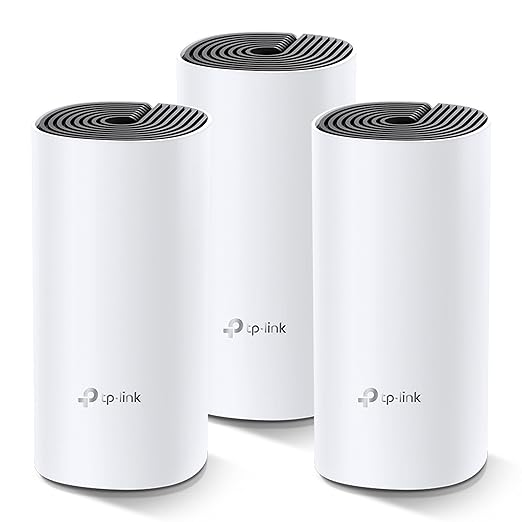
TP-Link Deco M4: Key Specifications
| Feature | Specification |
|---|---|
| Wi-Fi Standard | 802.11ac (Wi-Fi 5) |
| Wi-Fi Speed | Up to AC1200 |
| Bands | Dual-Band (2.4GHz + 5GHz) |
| Coverage | Up to 5,500 sq. ft. (3-pack) |
| Ethernet Ports | 2 Gigabit ports per Deco unit |
| Device Capacity | Supports 100+ devices |
| App Control | TP-Link Deco App |
| Security Features | WPA/WPA2 Encryption |
| Parental Controls | Yes |
| Guest Network | Yes |
| Voice Assistant Support | Compatible with Alexa |
| Operating Modes | Router Mode and Access Point Mode |
What Is the TP-Link Deco M4?
The TP-Link Deco M4 is a whole-home mesh Wi-Fi system designed to eliminate weak signal areas by using multiple units that work together under a single network name.
Unlike traditional Wi-Fi extenders, which often create separate networks and can reduce speeds, the Deco M4 allows devices to automatically connect to the strongest node as users move throughout the home.
This results in a smoother online experience with fewer interruptions.
Whole-Home Coverage Without Dead Zones
One of the standout features of the Deco M4 is its impressive coverage capability.
A three-pack system can cover up to 5,500 square feet, making it suitable for:
- Large apartments
- Multi-story homes
- Independent houses
- Home offices
Additional Deco units can be added later if users require expanded coverage.
This scalability makes the system a future-proof solution for growing connectivity needs.
Seamless Roaming for Uninterrupted Connectivity
The Deco M4 uses mesh technology to create a unified network.
Whether you’re attending an important Zoom meeting upstairs or streaming movies in the living room, your smartphone, tablet, or laptop automatically switches to the strongest Deco unit available.
Benefits include:
- Fewer connection drops
- Smoother video calls
- Better streaming experiences
- Improved mobility throughout the house
The transition happens in the background, without requiring users to manually reconnect.
AC1200 Dual-Band Performance
The TP-Link Deco M4 delivers combined wireless speeds of up to AC1200, divided between:
2.4GHz Band
Ideal for:
- Smart home devices
- Web browsing
- Messaging applications
- Connected appliances
5GHz Band
Perfect for:
- HD video streaming
- Online gaming
- Video conferencing
- Large file downloads
While it doesn’t support newer Wi-Fi 6 standards, the Deco M4 still provides sufficient performance for the average family and most broadband plans.
Handles Multiple Devices with Ease
Modern households often have dozens of connected gadgets operating simultaneously.
The Deco M4 is designed to support over 100 connected devices, making it suitable for:
- Smartphones
- Tablets
- Smart TVs
- Laptops
- Security cameras
- Voice assistants
- Smart lighting systems
For families embracing smart home technology, this capability offers considerable peace of mind.
Simple Setup with the Deco App
One reason the Deco series has become so popular is its beginner-friendly installation process.
The TP-Link Deco App guides users through setup step-by-step.
Setup Process:
- Download the Deco App.
- Connect the first Deco unit to the modem.
- Follow the on-screen instructions.
- Add additional Deco nodes around the home.
Most users can complete installation within minutes, even without technical expertise.
Useful Parental Controls
The Deco M4 includes built-in parental control features that help families manage internet usage responsibly.
Parents can:
- Create user profiles
- Set bedtime schedules
- Pause internet access
- Filter inappropriate content
- Monitor online activity
These tools are particularly valuable for households with children and teenagers.
Flexible Operating Modes
The system supports two different configurations:
Router Mode
The Deco M4 functions as the primary router for the home network.
Access Point Mode
Users can integrate Deco units with an existing router while benefiting from improved wireless coverage.
This flexibility ensures compatibility with a wide variety of home networking environments.
Design and Build Quality
The TP-Link Deco M4 features a minimalist design that blends easily into modern interiors.
Its compact, cylindrical appearance makes it less obtrusive than traditional routers with multiple external antennas.
Design highlights include:
- Clean white finish
- Compact footprint
- Ventilation openings for cooling
- Discreet status indicator lights
The understated aesthetics allow users to place units in visible areas without affecting home décor.
TP-Link Deco M4 Pros and Cons
Pros
✔ Excellent value for money
✔ Strong whole-home coverage
✔ Easy app-based setup
✔ Supports over 100 connected devices
✔ Seamless roaming technology
✔ Built-in parental controls
✔ Expandable mesh network system
Cons
✘ Limited to Wi-Fi 5 technology
✘ Advanced networking customization is relatively basic
✘ Power users may prefer higher-end Wi-Fi 6 systems
Who Should Buy the TP-Link Deco M4?
The Deco M4 is ideal for:
Families
Reliable coverage across multiple rooms ensures everyone stays connected.
Remote Workers
Stable connections support video meetings and productivity tasks.
Smart Home Enthusiasts
The ability to handle numerous devices makes it suitable for connected homes.
Budget-Conscious Buyers
It delivers many premium mesh benefits without a premium price tag.
TP-Link Deco M4 vs Traditional Wi-Fi Extenders
| Feature | Deco M4 Mesh System | Traditional Extender |
|---|---|---|
| Single Network Name | Yes | Usually No |
| Seamless Roaming | Yes | Limited |
| Coverage Expansion | Excellent | Moderate |
| Device Management | Centralized App | Often Separate |
| User Experience | Smooth | Can Be Inconsistent |
For households struggling with persistent dead zones, mesh systems generally provide a more effective long-term solution.
Final : Is the TP-Link Deco M4 Worth Buying in 2026?
The TP-Link Deco M4 Whole Home Mesh Wi-Fi System continues to be one of the strongest contenders in the affordable mesh networking category.
While newer Wi-Fi 6 systems offer faster speeds and additional features, many households simply don’t require that level of performance. For users seeking dependable coverage, simple setup, robust device support, and excellent value, the Deco M4 remains a highly practical choice.
Its combination of affordability, ease of use, and whole-home connectivity makes it particularly attractive for families, remote workers, and anyone frustrated by unreliable Wi-Fi signals.
If your goal is to eliminate dead zones and enjoy a more consistent internet experience throughout your home without overspending, the TP-Link Deco M4 deserves a place on your shortlist.
Get -52% OFF ON TP-Link Deco M4 Mesh Wi-Fi